Error Tracking
Sentiero captures errors from two separate sources that both surface in /issues:
- Client-side JS errors: captured automatically in the browser by the recorder when
config.capture_errorsis enabled. Errors are embedded in the replay event stream as rrweb custom events (type: 5,data.tag == "error") and appear inline in the replay timeline. No SDK configuration is needed beyond enabling the option. See The Recorder for the capture mechanics. - Server-side exceptions: captured by a separate Ruby reporter SDK that ships exceptions and custom events to a Sentiero ingest over HTTP. The reporter runs in the host app (as a Rack middleware or explicit calls) and is configured independently of the recorder.
Both paths converge on /issues in the dashboard, where errors are fingerprinted and grouped.
This guide covers the server-side reporter and ingest pipeline. For a quick start, see the “Server-side Error Tracking” section of the README.
Architecture
 host app                         Sentiero ingest                dashboard
┌───────────────────┐   POST     ┌──────────────────────────┐   ┌────────────┐
│ Reporter.notify   │──/errors──▶│ ErrorsApp  → fingerprint │   │ /issues    │
│ Reporter.track    │──/track───▶│ TrackApp   → server event│──▶│ /custom-   │
│ Middleware (Rack) │            │ (Bearer ingest key auth) │   │  events    │
└───────────────────┘            └──────────────────────────┘   └────────────┘
        cookies: sentiero_sid / sentiero_wid  ───────────────▶  links to replay
Two ingest lanes
The server lanes are separate from the public browser lane (EventsApp). They
require a per-project write-only ingest key (Authorization: Bearer <key>),
mapped to a project via Sentiero.configuration.ingest_keys:
| Lane | Rack app | Reporter call | Mount (convention) |
|---|---|---|---|
| Errors | Sentiero::Web::ErrorsApp |
Reporter.notify(exception) |
/sentiero/errors |
| Custom events | Sentiero::Web::TrackApp |
Reporter.track(name, ...) |
/sentiero/track |
The reporter’s endpoint is the base URL; it appends /errors and
/track. So endpoint = "https://sentiero.example.com" posts to
https://sentiero.example.com/errors and .../track (or under your mount
prefix if you mount the ingest apps there).
Fingerprinting (server-side)
Fingerprinting happens on ingest, not in the SDK. The ingest computes a fingerprint via Sentiero::Fingerprint from the exception class plus the top 5 frames (MAX_FRAMES = 5) of the backtrace. Each frame is normalized before hashing: hex memory addresses become 0xHEX and the source line number becomes :N (digits inside identifiers such as step_1 or V2::Api are preserved), so the same bug at a slightly different line still groups into the same issue. The result is a SHA-256 digest (truncated to 40 hex characters) that rolls repeated occurrences of the same bug into a single issue with an occurrence count, first/last-seen timestamps, and a status (open/resolved/ignored). Keeping this server-side means the SDK stays dumb and fast, and you can evolve the grouping heuristics without redeploying every client.
The reporter pipeline (client side)
notify/track → active? guard → ignore_exceptions → assemble payload
            → scrub(filter_keys) → before_notify (mutate/drop) → Dispatcher → Transport
- active? guard: no-op unless
endpoint+ingest_key+projectare set andenabledis true. - scrubbing:
filter_keysredact sensitive context/payload keys to[FILTERED]. - Dispatcher: by default delivers on a bounded background thread (
async,max_queue); when the queue is full, payloads are dropped and counted rather than blocking the request. Setasync = falsefor synchronous delivery (tests, short-lived scripts). - Transport:
HttpTransportby default; swappable (see below). Every stage is fail-safe: errors are rescued and warned, never raised into the host app.
Configuring the reporter
require "sentiero/reporter"

Sentiero::Reporter.configure do |r|
  r.endpoint = ENV["SENTIERO_ENDPOINT"]
  r.ingest_key = ENV["SENTIERO_INGEST_KEY"]
  r.project = "my-app"
  r.environment = "production"
  r.release = ENV["GIT_SHA"]

  r.ignore_exceptions = [ActiveRecord::RecordNotFound, "ActionController::RoutingError"]
  r.before_notify = ->(report) { report["context"].delete("internal"); report }
  r.filter_keys = [:password, :token, /secret/i]
end
See the reporter configuration table for every key.
Filtering noise
ignore_exceptionsaccepts Class objects or String class-names. A match against the exception class or any of its ancestors drops the report, so subclasses of an ignored error are dropped too. String names are useful for exceptions defined in gems you don’t want torequireat config time.before_notifyis a last-mile hook called with the mutable report hash ("exception_class","message","backtrace","context","timestamp", optional"session_id"/"window_id"). Mutate in place to enrich or redact; returnfalse/nilto drop. A raising hook is caught and the unmodified report is delivered.
Context and replay linkage
Context attached to the reporter is merged into every report from the current thread:
Sentiero::Reporter.add_context(user_id: 42)            # sticky for this thread
Sentiero::Reporter.with_context(request_id: "r1") { ... }  # scoped, auto-restored
Sentiero::Reporter.clear_context
When the context (or notify(..., context:)) includes session_id /
window_id, the ingest links the issue occurrence to that session’s replay. The
Rack middleware populates these automatically from the sentiero_sid /
sentiero_wid cookies set by the recorder, so a 500 you see in /issues has a
“watch replay” link to the moments before the crash.
Transports
| Transport | Use | Behavior |
|---|---|---|
HttpTransport (default) |
production | POSTs JSON with the Bearer ingest key, bounded timeouts |
LogTransport |
development | logs would-be deliveries to an IO or logger |
NullTransport |
disable delivery | drops everything, counts delivered |
TestTransport |
tests | records [path, payload] deliveries in memory |
r.transport = Sentiero::Reporter::LogTransport.new(logger: Rails.logger)
r.transport = Sentiero::Reporter::NullTransport.new
A transport is any object responding to post(path, payload).
Capturing in your tests
captured = Sentiero::Reporter.capture_notifications do
  perform_action_that_should_report
end

assert_equal "errors", captured.first.first
assert_equal "ArgumentError", captured.first.last["exception_class"]
capture_notifications installs a synchronous TestTransport for the duration
of the block, then restores your previous transport (even if the block raises).
Deployment
Mount the ingest lanes alongside your dashboard. In a config.ru:
map("/errors")  { run Sentiero::Web::ErrorsApp.new }
map("/track")   { run Sentiero::Web::TrackApp.new }
map("/")        { run Sentiero::Web::DashboardApp.new }   # protect with auth!
With Rails, use mount Sentiero::Web::ErrorsApp.new, at: "/sentiero/errors" and similarly for TrackApp in config/routes.rb.
Issue a per-project ingest key (Sentiero.configuration.ingest_keys) and set it as ingest_key in each reporting app’s reporter config. The Rails engine auto-inserts Sentiero::Reporter::Middleware (zero-config capture); opt out with Sentiero::Rails.configure { |c| c.reporter_middleware = false }. See Rails.
The dashboard
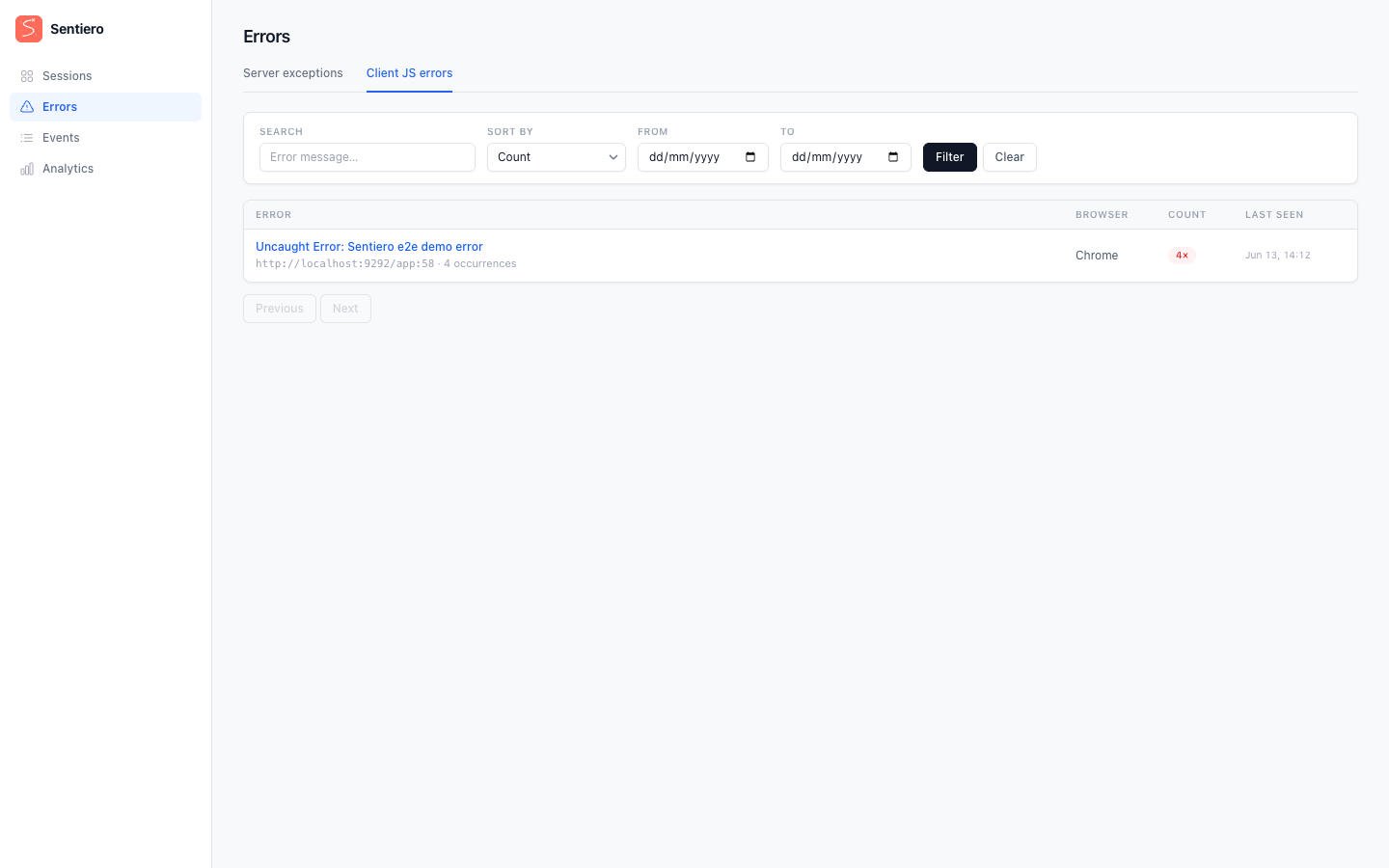
/issues: fingerprinted server (and client/JS) errors, with occurrence counts, first/last seen, status filters, and a link to the linked session replay where available./custom-events: the default listing shows non-error business signals sent server-side viaReporter.track, filterable by level. Declarativedata-sentiero-track-*andwindow.Sentiero.addCustomEventevents are rrweb type-5 custom events, not server events, so they are not in this default listing; they appear under the Browser events tab (/custom-events?source=browser), and inline in the session replay’s Events view (see Custom Events).
Both live under the DashboardApp mount. Protect that mount; see
Authentication.
Crystal & Marten
A Crystal/Marten port of the reporter, sentiero-cr, speaks the same ingest protocol, so a Crystal app and a Ruby app can report into the same Sentiero project. It provides Sentiero::Reporter.notify / .track and an optional Marten middleware that auto-captures unhandled exceptions and links them to browser sessions via the recorder’s cookies.
See the Crystal & Marten guide for installation, configuration, and the cross-language setup.